Yes, it’s overbuilt. Way overbuilt. Ridiculously so. Ludicrously so.
Yes, I know oh-my-zsh exists. It’s uneven. Yes, I plagiarized components from it. Then I revised, refined and rewrote them. Yes, some of this could be done automagically with fish, but fish isn’t built in everywhere and zsh is. Yes, I could do some of it with GNU stow, or whatever. This works for me. If it works for you too, great. If not? ¯\_(ツ)_/¯
What I was after
A shell profile that knows what platform it’s on and behaves. The original goal was macOS, Linux, Solaris, AIX, BSD, blah, blah, blah. It started out as bash, because bash was everywhere. It generated its own prompt instead of using starship or powerline, because reasons.
The Solaris and AIX support got deprecated out once I stopped working on them and stopped running into them in the field. Today it’s zsh on macOS and Linux, and it uses Starship.
It in use
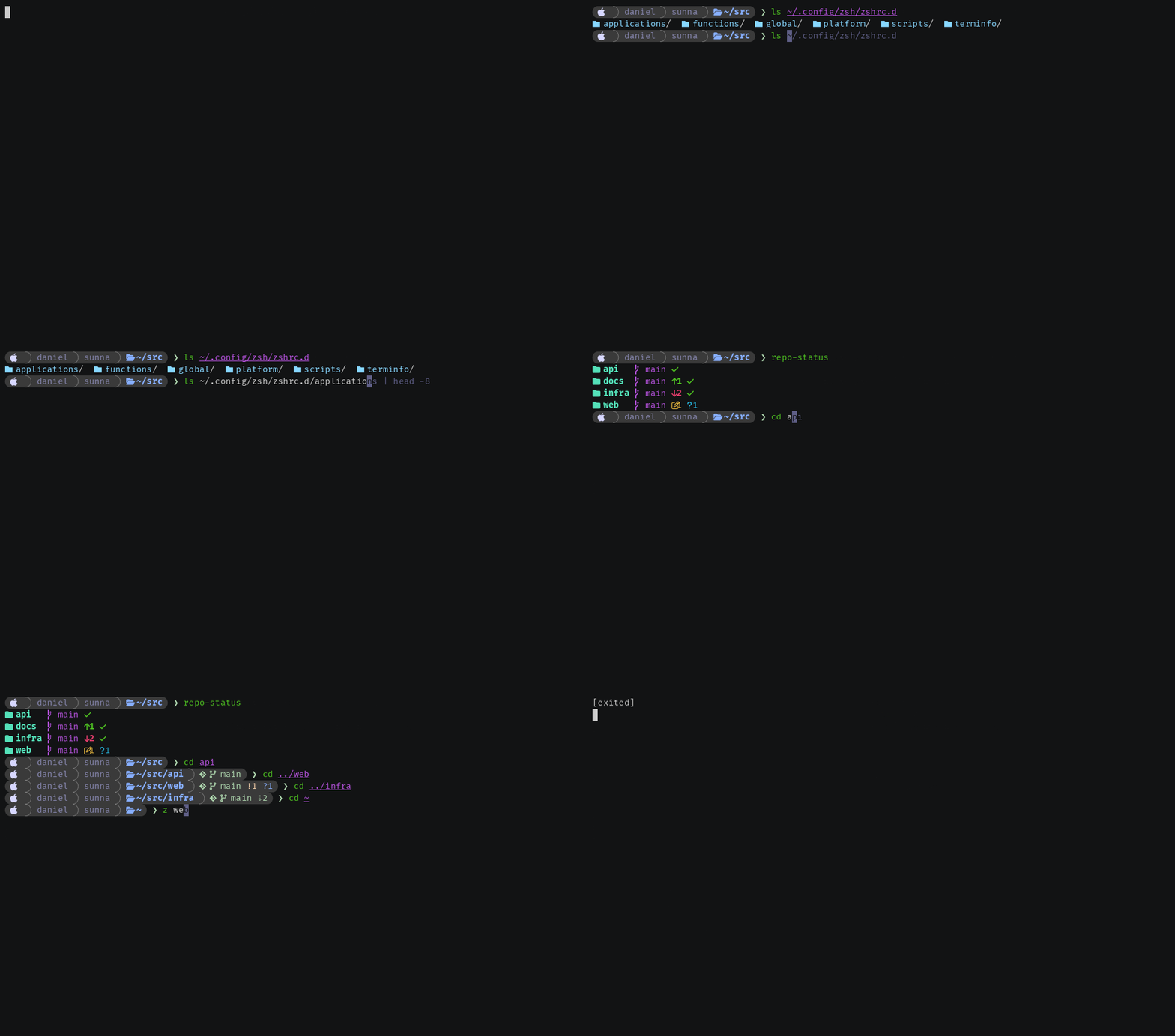
Here’s a quick tour in a scratch home directory, so it’s not my real history. It
lists the config, runs repo-status across a few repos, jumps around with zoxide,
searches history with Atuin, and tab-completes git.
asciinema play.Where things go
Here’s how the repo is laid out. Most of the logic is in the order things load.

.zshenv runs for every shell. It sets the XDG paths, creates the directories,
points ZDOTDIR at ~/.config/zsh, and resets PATH. A non-interactive shell gets
the path and nothing else, so scripts stay fast.
.zshrc is the interactive loader. History lives in the XDG state directory.
Completion is cached and rebuilt once a day. The helper functions get autoloaded. Then
it sources three groups of files, in this order:
global/is for everywhere. It picks the prompt. Starship is the default, and Powerlevel10k is still there if I want it. So is the original prompt I generated myself.platform/has one file per operating system,darwin.zshrcandlinux.zshrc. Anything that only makes sense on one OS goes here.applications/has one file per tool, 58 at the moment. They load in alphabetical order, so the names matter.00_brewgoes first so Homebrew is on the path.zz-carapaceandzz-selectionsgo last, so the final preferences get decided after every integration has loaded.
functions/ holds autoloaded helpers, including the guards below. scripts/
holds support scripts, like the iTerm2 check.
The profile has a few small helpers of its own, like is-executable, is-directory
and is-readable. They’re plumbing for the profile itself, not something I type.
This is the guard every application file starts with, using one of them. If the tool
isn’t there, the file quietly does nothing:
is-executable example || return

export EXAMPLE_CONFIG="${XDG_CONFIG_HOME}/example/config"
alias ex="example"
That’s how the same profile runs on a laptop with everything installed and on a bare
server with almost nothing. zz-selections handles the overlap. History uses Atuin
when it’s there and falls back to fzf when it isn’t.
The tools
I use a lot of tools. Some of them overlap, and some are redundant. I don’t need them all on every platform, which is why every integration checks first.
| Tool | What it does here |
|---|---|
| Starship | The prompt, in Catppuccin Mocha. The hostname changes color over SSH so I know which box I’m on. It reads the hostname from environment variables set once, because spawning a command for it on every prompt was slow. |
| Atuin | Shell history in a searchable database that knows the directory and the exit status. Ctrl-R and the up arrow use it. |
| zoxide | Replaces cd with ranked jumps that learn where I go. z web and I’m there. |
| fzf, fd, ripgrep | Fuzzy finding for files, history and completion, over fast file and text search. |
| Carapace | Completions for tools that don’t ship a good completer. Native zsh completers win where they exist, and Carapace fills the gaps. |
| fzf-tab | Puts the completion menu in fzf. |
| eza, bat, vivid | A better ls, a better cat, and the ls colors. |
| jq, yq, fx, jless, xh, glow | JSON and YAML tools, a JSON pager, an HTTP client and a Markdown renderer. |
| direnv, assh | Per-directory environments, and a wrapper that adds inheritance and gateways to ssh config. |
| kubectl, kubecolor, k9s, helm, helmfile, kubectx, kubens | Kubernetes, in an opt-in group. Tanzu and Carvel are another. |
| gh, delta, lazygit, gitleaks | Git, and secret scanning. |
| 1Password CLI, Vault, step, Trivy, Grype | Secrets, certificates and scanners. |
| tmux, Vim, Neovim | Multiplexing and editors. Neovim has Catppuccin, LSP and format on save. |
I also keep a few repo-* scripts for working across many repos: status, GitHub
Actions results, parallel fetch, safe pulls, and a branch audit. Here’s repo-status
in the tour above, showing a clean repo, a dirty one, one ahead and one behind.
How fast is it
Not very. I timed zsh -i -c exit, a full interactive startup, on an M1 Max running
macOS with zsh 5.9. Each shell ran under a real pty, after a few warm-up runs. Times
are in milliseconds.
| Setup | Median | Mean | Min | Max | Runs |
|---|---|---|---|---|---|
Bare zsh (zsh -f) |
8 | 9 | 7 | 12 | 40 |
| The profile, scratch home from the tour | 434 | 457 | 391 | 711 | 40 |
| The profile, my real home | 359 | 359 | 333 | 391 | 20 |
The scratch home is slower than my real one. I haven’t chased down why.
The profile has a ZPROF switch that turns on zsh’s profiler. These are the biggest
costs it reports, again from the scratch home:
| Function | Calls | Total (ms) |
|---|---|---|
| Plugin loader | 4 | 97.8 |
compdef |
305 | 13.5 |
compinit |
1 | 9.5 |
is-executable |
74 | 6.9 |
is-supported |
4.3 | |
_zsh_highlight_bind_widgets |
3.3 |
Plugins are the biggest single cost, and compinit is cheap because it only rebuilds
once a day. A trace of the whole startup points the same way: the completion setup
and the plugin loaders take the most time.
Several tools also generate their zsh integration when the shell starts. This is what each one costs to print its init code, from 40 runs:
| Tool | Median (ms) |
|---|---|
| Atuin | 12.2 |
| Carapace | 10.5 |
| direnv | 7.6 |
| Starship | 7.4 |
| fzf | 4.4 |
| zoxide | 3.3 |
That’s about 45 ms for all six.
Two installers
There are two, both in Python, and each one is driven by its own JSON manifest.
The dotfiles
setup.py reads manifest.json and does three things. You can run it with
--dry-run first.
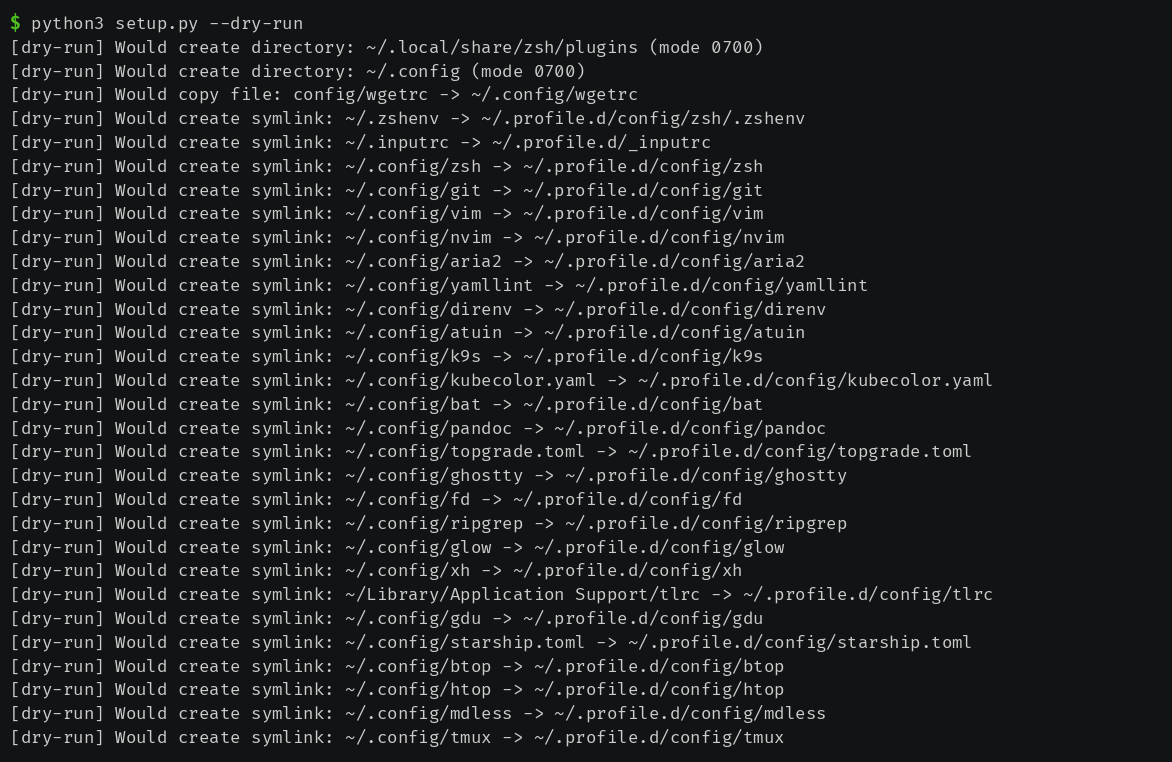
setup.py --dry-run against an empty home directory.directoriesare created with a mode. There are two of them, the plugin directory and~/.config, both private.filesare 34 entries, each with a source, a target and a type. Alinkis a symlink back into the repo, which is what keeps the config tracked. Acopyis for files that shouldn’t be linked. Targets can use variables like${XDG_CONFIG_HOME}, and a couple of entries carry anosfilter, like the tlrc config that only makes sense on macOS.gitreposare 24 plugins to clone: zsh plugins, Neovim plugins and Vim plugins. Almost all of them are shallow clones, and one is pinned to a stable branch.
If a target already exists, it’s skipped. --force replaces existing links, and a
copied file is kept as .orig.
The tools
The other installer, tools/install.py, reads its own manifest, tools/manifest.json.
It installs my minimal set of tools, from releases or brew, into ~/.local/bin. I
wrote it so I could get a useful, populated tool chain even in more restricted
environments.

general installs by default.Tools are organized into groups. Only the group marked default installs, which is
general. +k8s or +tanzu opt in to more, and -k8s deselects a group and removes
what the installer put there.
Each tool is a small entry:
repois a GitHub project. It always resolves the latest release, anonymously, so there’s no token.matchis a regex per operating system, applied to the release’s file names.{arch}expands to whatever names the machine’s architecture goes by. A tool with no match for the current OS is skipped with a notice.brewoverrides the Homebrew formula name, or turns brew off for that tool.noteexplains the oddities.ezaonly publishes Linux binaries, so on macOS it comes from Homebrew.tldris two different clients, tealdeer on Linux and tlrc on macOS, each with its own config.
On macOS it prefers Homebrew formulae and symlinks them into place. --no-brew always
fetches binaries, and --prefer-binary flips the preference.
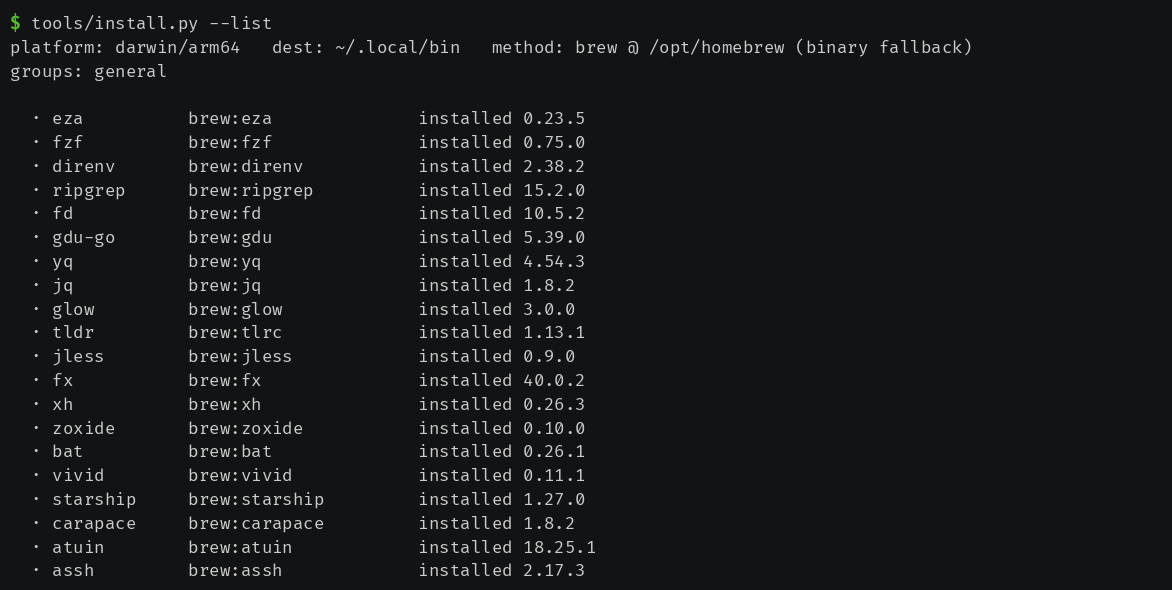
--list shows the plan before it does anything. This is a Mac with
Homebrew, so it would use brew, and everything here is already installed.There’s also a controller mode. --cache-dir with --for linux/amd64 downloads the
binaries for another platform into a cache instead of installing them, which is handy
for a box that can’t fetch things itself.
Where it stands
It targets macOS and Linux, on both amd64 and arm64. It’s a personal configuration, so expect to read it before you run it.
Comments
Comments are GitHub Discussions and need a free GitHub account. Nothing is loaded from GitHub or giscus until you ask for it.